
When we talk about direct access from our own device to a remote smartphone, computer or phone, we think of "TeamViewer". In the Zoom cloud service, "remote access" is standard functionality that is present in all free and paid licenses. Using the Zoom platform, you can just as easily take over control of a device on behalf of its main user (let us call him the "participant").
How does this work technically? The "remote access" option is available in Zoom meetings; it appears during "screen sharing". During an online event, a participant requests permission for remote control from the person who is sharing their screen. For the participant, this option is located in the "view options".
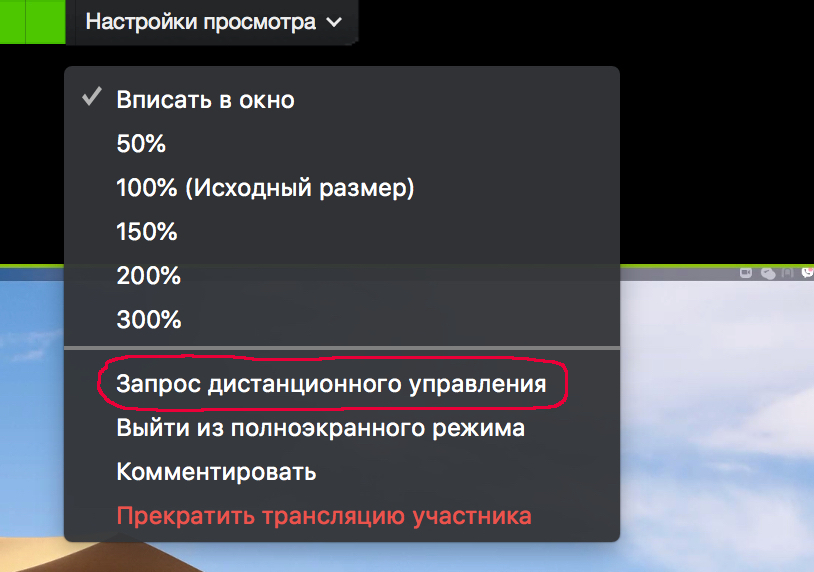
The person sharing gets a confirmation request. If the person sharing confirms it, the participant can control the computer or an individual application (depending on what is being shared). Control is paused if the person sharing moves the mouse or starts using the keyboard. The person sharing can stop remote control at any moment.
Now any technical problem can be solved remotely using only the Zoom platform. Carry out your day-to-day IT tasks in the comfortable environment of your own desktop.
There is no need to worry about the security of access to your computer. The Zoom service uses the most up-to-date tools, which will ensure your security and the security of your customers. You can read more about security here and here.
Zoom.us is constantly optimizing and and expanding its platform. Updates come out at least once a month. Would you like to learn more about how to use Zoom for communication? The Rightconf specialists are ready to tell you more about what Zoom can do!
Try Zoom today
We'll give you a remote demo Monday to Friday, 10:00–16:00 Moscow time, answer all your questions and provide trial access so you can explore the system yourself.
Please note: we work with legal entities only.
